



How to change location on iOS 17 when you’re stuck at home while the hottest singles are just a swipe away? Perhaps you want to fool your friends into thinking you’re basking on “Ein Gedi” beach in Jordan when you’re actually lounging on your couch.
Or you’ve likely imagined teleporting your iPhone iOS 17 to a busy city to spice up your social experience. But who has the time for complicated setups? If you’re looking for an easy way to make your iPhone believe you’re anywhere but home, this tutorial is for you!
Part 2: Why People Want to Change Location on iOS 17?
You might want to learn how to spoof location on iOS 17 due to certain reasons. Here’s a complete breakdown of what those causes might be:
- Privacy Protection – Some apps ask for your location for reasons that don’t seem related. Changing your location can help prevent them from tracking your real movements and building a detailed profile on you.
- Control What You Share – You might be okay with some apps knowing your location but not others. Changing your location lets you decide which apps get real-time access to your whereabouts.
- Game Benefits – Games like Pokémon GO use your location to determine what appears in game. By changing your location, you can teleport to different areas to catch rare Pokémon and access special events that aren’t available where you are.
- Discover New Content – Social media and dating apps often show content or connections based on location. Changing your location can expose you to different trends, cultures, and people from other regions
Part 3: Full Guide: How to Change Location on iOS 17?
Rather than being physically in a spot, you can spoof your GPS location to anywhere in world using an iOS 17 Location Changer like Tenorshare iAnyGo. It can change your location to your desired coordinates so you can use geo-restricted apps and broaden your horizon.
Use the Best iOS 17 Location Changer – Tenorshare iAnyGo
Tenorshare iAnyGo is the best iPhone Location Changer you can grab in 2024. It can not only iOS 17 spoof location but also do it successfully so no detection system can diagnose you’re faking location. For that, it has many shields in place like a cooldown timer that prevents you from changing your location frequently so you don’t get banned.
You can also adjust your moving speed. So, you won’t teleport from one place to another in a time that’s not physically possible and can land you in hot waters. Here are more key features of iAnyGo at a glance:
Major Functions:
- Custom Routes – Users can manually set specific paths on a map for their device to follow.
- Joystick – Helps change direction at your desired speed while following a route.
- Map Zoom – Zoom in for detailed route planning and virtual exploration.
- GPX File Support – Import or share pre-planned routes using GPX files.
- One-Click Movement – Start moving along a set route with a single click.
- Real-Time Direction Control – Quickly change direction based on in-game needs.
- 360-Degree Control – Adjust your movement direction freely at any time.
- Time Recording – Log specific times for saved locations for precise actions.
- In-game Teleportation – Instantly jump to a specific location in game, saving time and effort.
- Address Saving – Save and quickly access previously searched addresses.
- Compatibility – Works with location-based games, dating apps, and social platforms like WhatsApp and Facebook.
- Multi-Device Control – Manage up to 15 devices at once, perfect for multiple accounts.
Full Steps:
Here’s how to change location on iOS 17. Clear Tutorial Updated:
Step 1: Download, install, and open iAnyGo on your computer. Then, connect your iPhone to same computer and unlock it to trust your PC. Click “Enter” on iAnyGo’s interface.

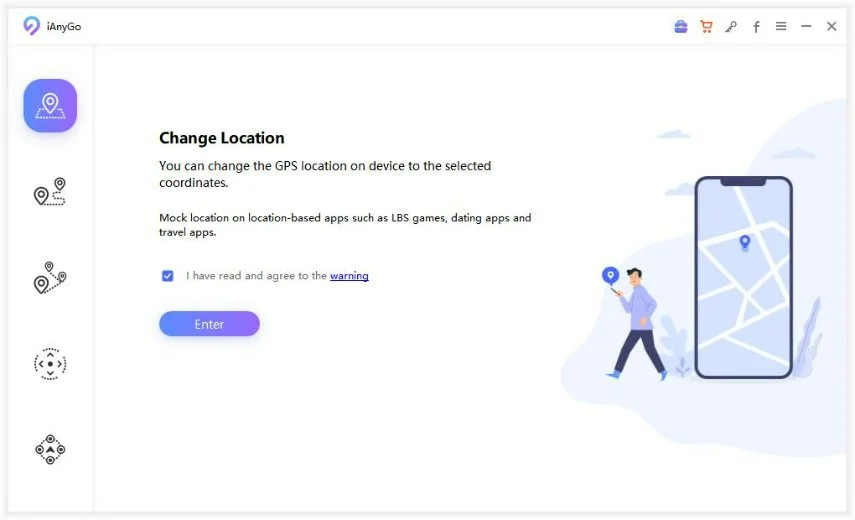
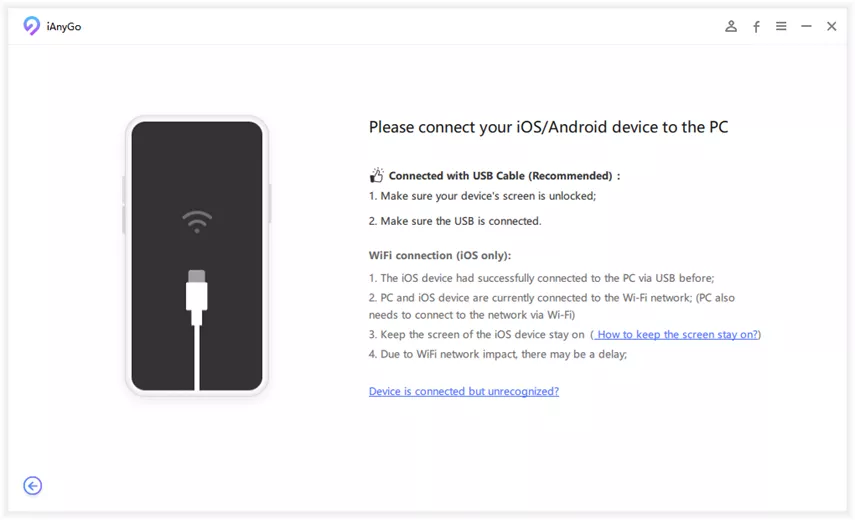
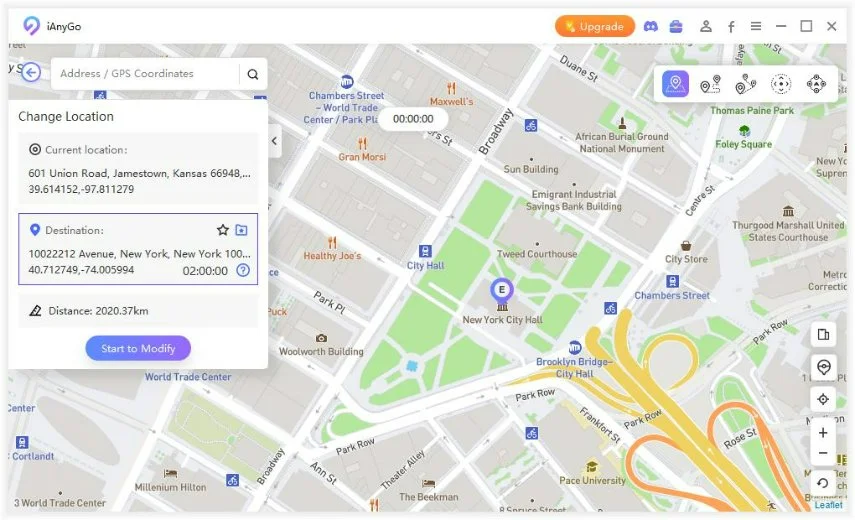
Step 2: Choose your iPhone, then to change location enter your desired address or GPS coordinates, and click “Start to Modify.” All location-based apps on your iOS 17 iPhone will change to a fake location.
Why Choose Tenorshare iAnyGo?
If you’re looking forward to knowing how to change location on iOS 17, Tenorshare iAnyGo is a top pick in 2024. It has easy-to-use features, lets you create custom routes, teleport to your desired location in a blink, and start automatic movement, making gameplay more efficient.
Real-time direction control, GPX file import/export, and multi-device management also add flexibility. While Map Zoom and app compatibility enhance overall location spoofing experience. Not to mention an adjustable moving speed and a cooldown timer allow you to use geo-restricted content without fear of getting banned.
Pros:
- Spoofs location without jailbreaking/rooting.
- Offers single-spot, multi-spot, and joystick movement for customizable location spoofing.
- User-friendly design, suitable for all skill levels.
- Manages multiple devices at once.
- Simulates natural movement to avoid detection.
- Reduces risk of account bans by including natural breaks between sessions.
- Regular updates and free technical support.
Cons:
- Full access requires a purchase.
Learn how to change location on iOS 17 with practical steps:

Part 4: Conclusion
Knowing how to change location on iOS 17 can unlock geo-restricted content and improve your gaming experience. Tenorshare iAnyGo is perfect for this as it offers an easy-to-use interface, custom routes, adjustable moving speed, cooldown timer, and features that mimic natural movement. So, spoof your iPhone’s location with iAnyGo and virtually travel to your heart’s content from comfort of your couch.
Hot FAQs About iOS 17 Location Changer:
- What is an iOS location changer?
An iOS location changer is a tool that lets you fake your iPhone’s GPS location, making it seem like you’re somewhere else without actually being there.
- How do I change my iOS 17 phone location?
You can change your iOS 17 using a spoofing tool like Tenorshare iAnyGo successfully. It offers a foolproof spoofing solution that allows you to change your iPhone location to your desired coordinates. This enables you to travel virtually anywhere in world without physically moving.