Introduction
Creating top-quality videos is really easy now, and it does not have to mean spending a lot of money on the software or having tough skills in editing. Today, AI-powered programs help filmmakers in a speedy way of video editing, fixing image quality without human assistance, and, at the same time, they make the creation of social media posts quite easy.
Out of all these tools, Vmake is recognized for providing powerful AI editing capabilities to creators, marketers, ecommerce sellers, and influencers.
With this Vmake review, we aim to reveal its main AI video editing tools, features, pricing, pros, cons, and the target users for this product.
What Is Vmake?
Vmake is a video editing platform powered by AI to assist creators in generating great quality content in a fast and effortless way. It operates right on your browser and is offered as a mobile app, which makes it handy for editing on both PC and phone.
It primarily caters to the production of short-form content, talking-head videos, ecommerce clips, and social media content for TikTok, Instagram Reels, and YouTube Shorts, basically the content platforms most used by young audiences.
Key Categories of Features
According to the official features listing, Vmake utilizes AI to deliver various content creation solutions, including:
- AI video enhancement: Enhancing the quality of a video by changing its resolution, sharpness, lighting, and general look.
- Video background removal: Ability to remove backgrounds or substitute them without a green screen.
- Watermark removal: Very doable to improve a video by erasing unwanted logos, texts, or marks.
- Auto captions: Automatically creating subtitles to make the content more accessible and to boost viewer interaction.
- AI video generation: Making videos using AI-driven templates and automation tools.
- Noise reduction: Reduce interference sounds without losing voice clarity in videos.
First Impressions and User Experience
Vmake features a neat, easy-to-use interface designed around straightforward one-click workflows. Uploading videos is a breeze since you can easily drop the files and all the processing is done in the cloud, so results are even faster.
Without any doubt, Vmake is the easiest option for those that don’t edit videos since it doesn’t ask for any level of advanced editing skill like in case of the traditional software. Besides, the platform is very good at handling work both with desktop browsers and mobile devices, so it is very convenient for creators who are always on the move.
Vmake’s AI Video Enhancement Features
We tested Vmake’s AI Video Enhancement tool, and the process was very simple. We uploaded a low-quality video, and the AI automatically improved it without any manual settings.
It applies AI to unblur, sharpen, and even recreate visuals that are missing in the video, thereby giving clearer versions that can be in 2K, 4K, or even AI 4K+ quality levels.
Different from old-fashioned filters, it thoroughly examines frames to enhance motion fluidity, correct lighting, reduce noise, and bring back textures in a natural way, so that the video does not appear to be tampered with at all.
Besides, there is a set of distinctive enhancement modes tailored for specific objectives like portraits, products, low-light, gameplay, and animation, which are very handy for those who create social media content, ecommerce ads, or AI-generated clips.

Testing the Video Background Removal Tool
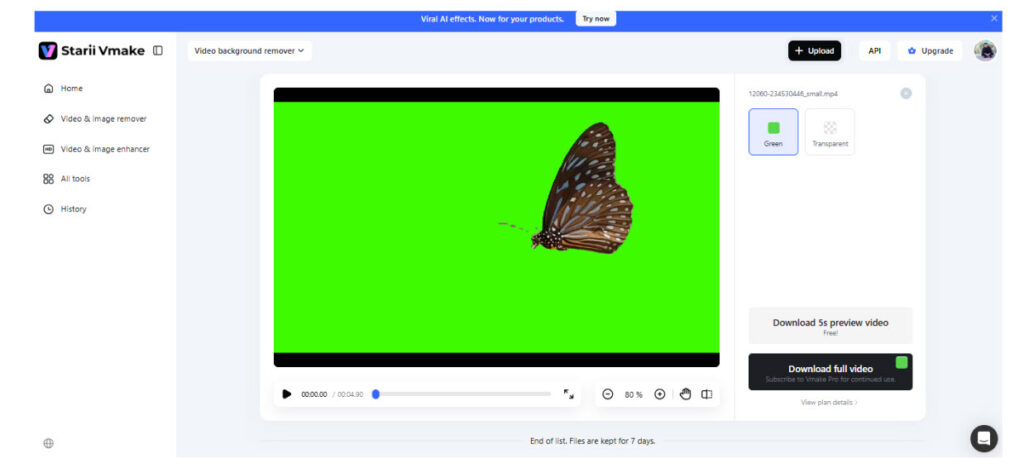
We also tested Vmake’s Video Background Remover, and it was very straightforward to use. We simply uploaded a video, and the AI automatically detected the subject and removed the background without needing a green screen.
It identifies the subject in every frame and separates it from the background, thus giving creators the option to export either a transparent video or a green screen one for further editing. Hence, it is very advantageous for ecommerce ads, talking-head videos, product demos, and social media content where visuals need to be clean.
How Well Does the Watermark Removal Tool Perform?
For those who are removing old or branded footage, AI-powered watermark removers aim at making one of the most time-consuming editing tasks a thing of the past completely.
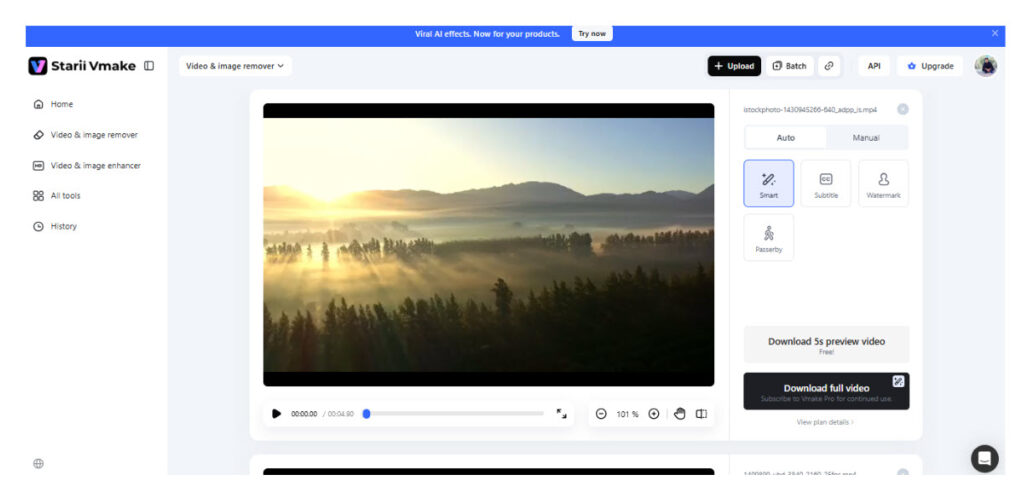
We tested Vmake’s Watermark Removal feature, and it was very smooth from start to finish. Initially, we uploaded a video that had a watermark, and the tool recognized the watermark on its own without any manual selection. Besides that, the tool also took care of the watermark’s movements across frames, erasing it persistently while the rest of the video remained unchanged.
Having processed the video, when we observed the preview, the background seemed to be recreated quite naturally without any obvious blurring or distortion. In cases of more complicated regions, apart from erasing, the protect zone option was also available, which contributed to the optimization of the output and preservation of essential details.
Performance, Pricing, and Limitations
Processing speed
As Vmake operates on cloud-based processing, the speed will vary based on video size, the type of tool used, and server load. For smaller edits, it will be quick in most cases, whereas AI tasks like video enhancement or upscaling may require more time.
Pricing model
Vmake has a freemium approach with the main subscription plans consisting of three levels.
- As for Free, it limits credits and basic features, besides having watermarked videos.
- Plus plan at $9.99/month will enable all core AI tools like watermark removal, enhancer, and the ability to export videos up to 1080p.
- Pro plan at $29.99/month is geared towards heavy users, and it redounds to higher levels of credits, quicker usage limits, and the ability to export up to 2K and 4K, including full commercial use rights.
Limitations
The free version comes with very strict usage restrictions as well as watermarked videos. Also, certain advanced AI models and high-resolution exports are exclusive to paid plans.
Vmake vs Traditional Video Editing Software
| Feature | Vmake | Traditional Video Editing Software (Premiere Pro, Final Cut, etc.) |
| Ease of use | Beginner-friendly, one-click AI tools | Steep learning curve, requires training |
| Editing style | AI-powered automatic editing | Manual frame-by-frame editing |
| Speed | Fast for AI tasks (cloud processing) | Depends on system performance |
| Background removal | Built-in AI tool, no green screen needed | Requires manual masking or plugins |
| Video enhancement | One-click AI upscaling and repair | Requires advanced color grading tools |
| Watermark removal | Automated AI removal tools | Not natively available |
| Flexibility | Limited manual control | Full creative control |
| Best for | Social media creators, marketers, ecommerce | Professional editors, filmmakers |
Final Verdict
For creators looking for quick, easy, and AI-driven video editing without the hassles of complicated tools, Vmake comes out as a compelling option. Its capabilities, such as video enhancement, background removal, and watermark removal, seem most fitting for social media content, ads, and ecommerce videos.
Although it is not a substitute for professional-level editing software when it comes to advanced filmmaking, in fact, it caters quite well to the needs of casual creators who put a high value on speed and automation. Summing it up, it is a handy tool for creating my-pleasing looking and nice quality videos at very low effort.

Recent comments